Loadmark

Everything between one inspection and the next booking

From the phone in the plant, to the certificate in the client's inbox, to the reminder that brings them back to you.

1

On site

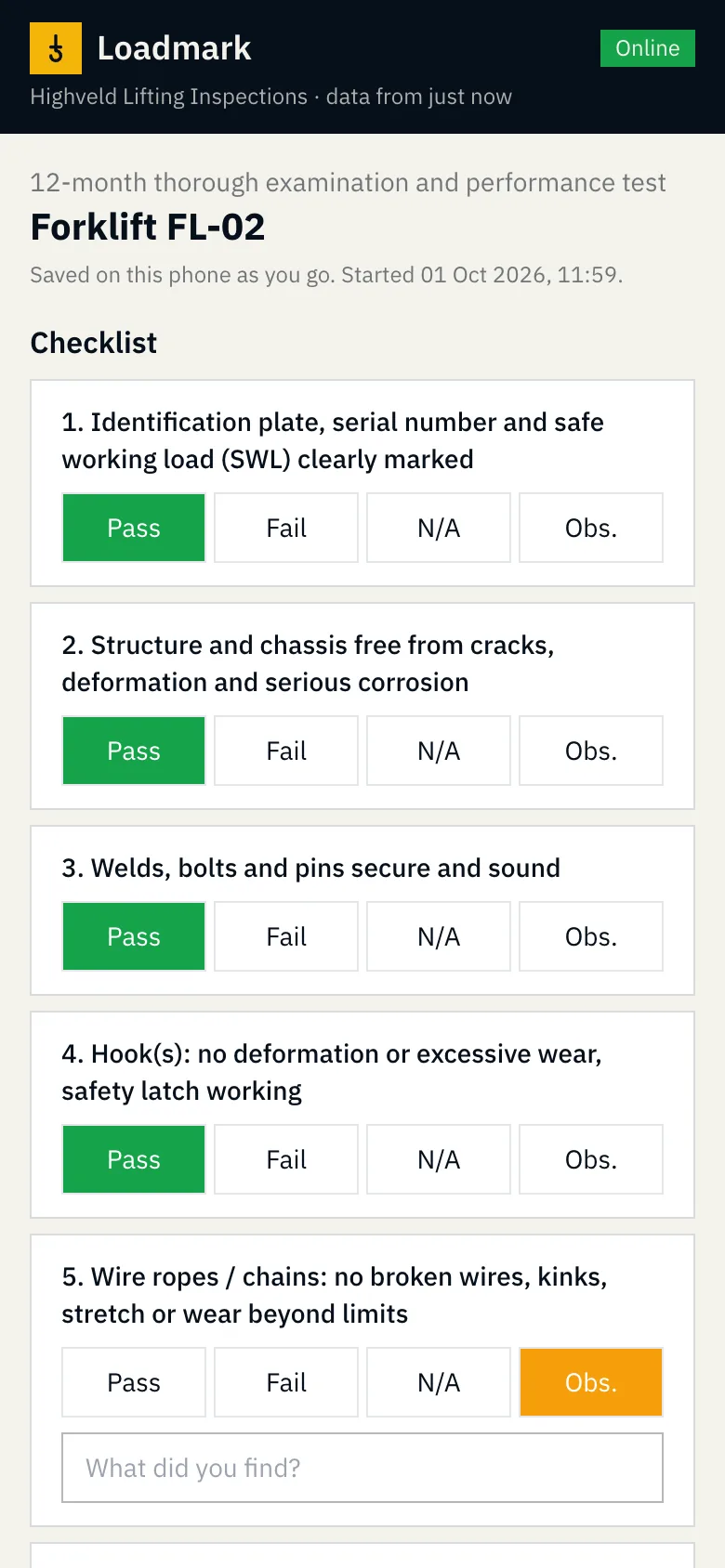
An inspection app that doesn't need signal. Everything the inspector needs is kept on the phone.

  • Today's jobs, every client site and every machine, available offline
  • Find machines by fleet number or serial number, or scan a code: the certificate's QR, or the client's own asset barcode
  • Pass, fail, N/A or observation per checklist item, with comments and photos
  • Load test with the percentage of SWL worked out; the instrument is picked from your test equipment, and one whose calibration has expired can't be used
  • A whole site's slings and shackles on one form, with a result per item; add new tackle by scanning tags one after another or pasting a list
  • Repeat last inspection: last time's answers filled in, every item still confirmed with a tap
  • Several identical machines at once: one checklist, differences per machine, a certificate each
  • Send the certificate on WhatsApp straight from the phone
  • Every tap saved on the phone; signed inspections upload when signal returns
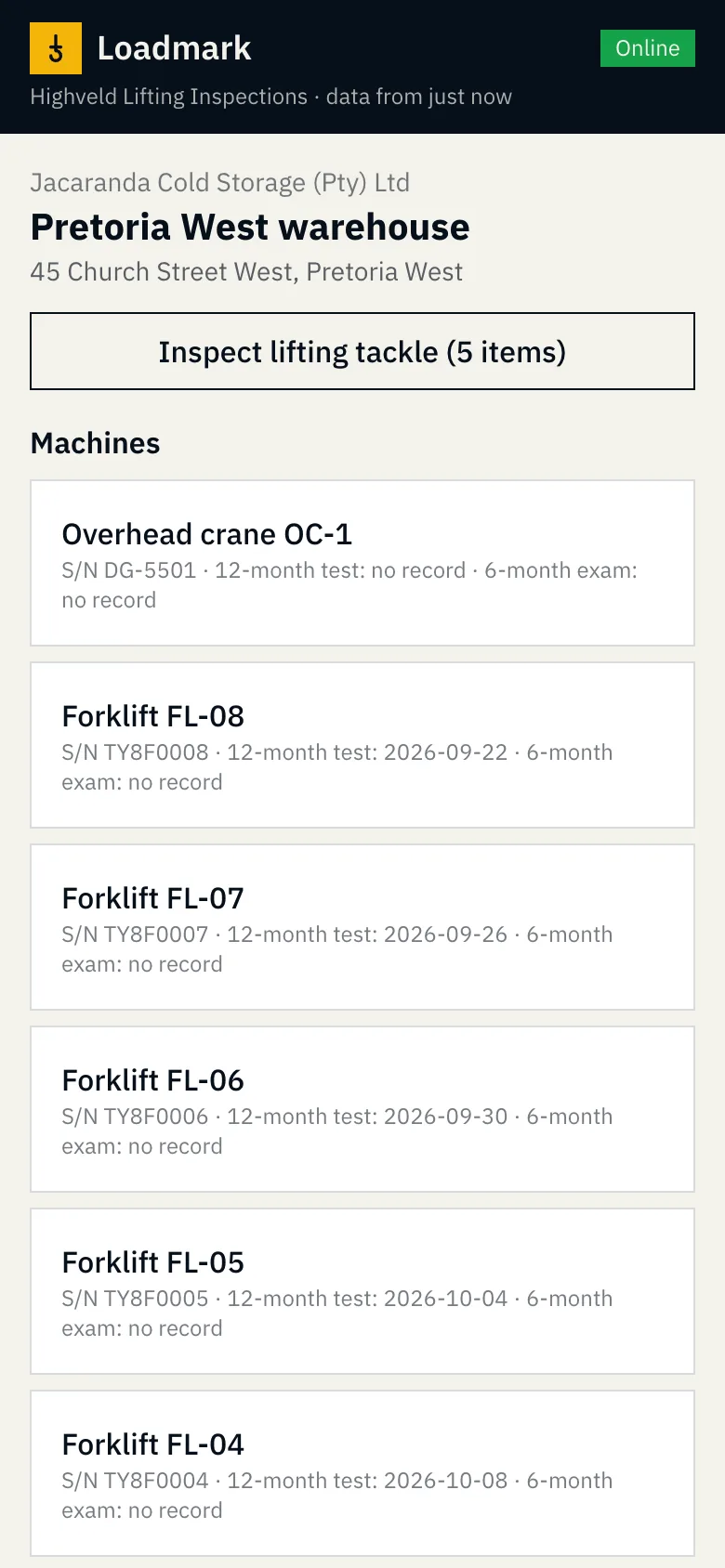
A client site's machines and due dates on the inspector's phone An inspection checklist on the phone
Fig. 1 · A site's machines, and a checklist in progress

2

Certificates

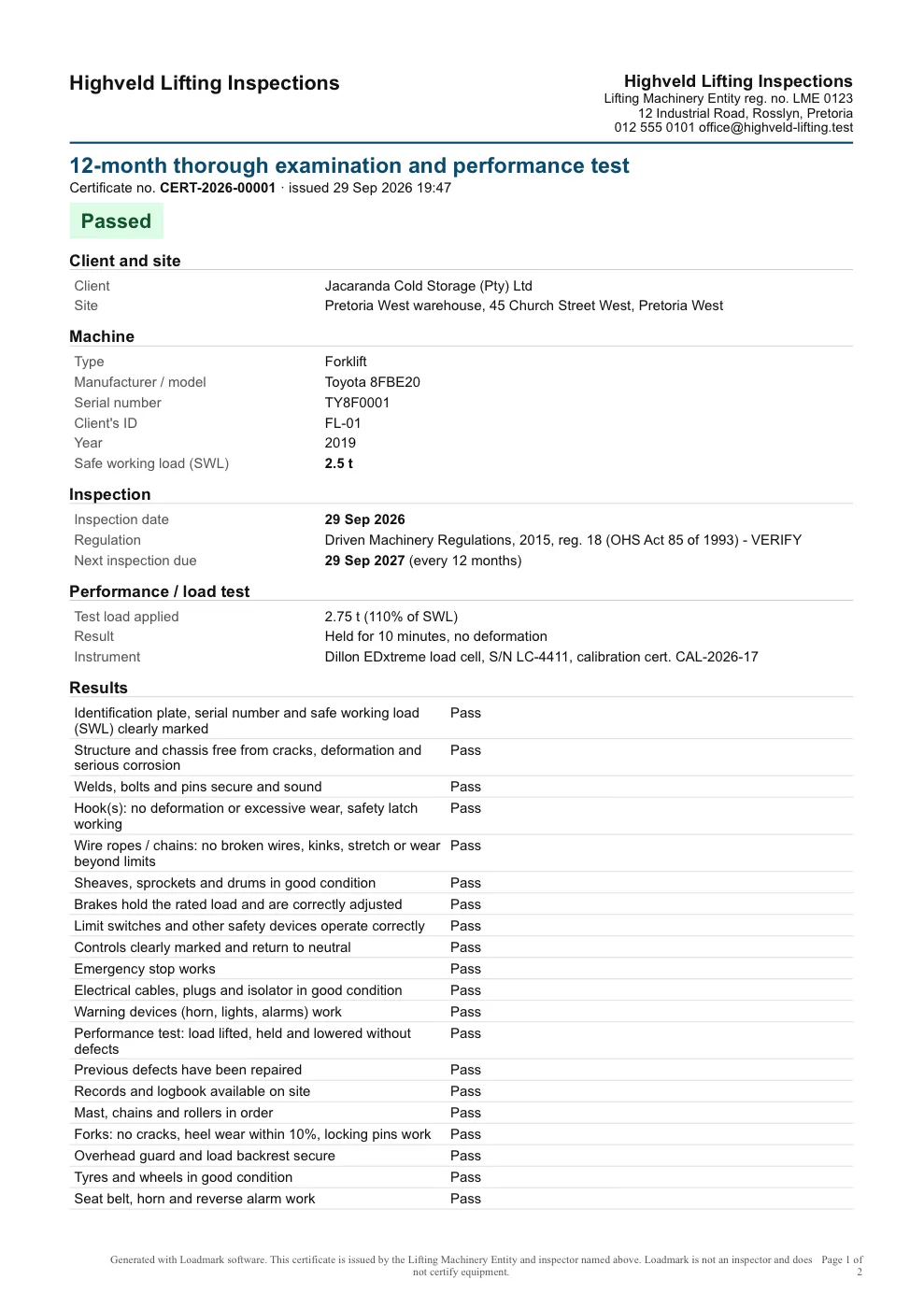
The moment the inspection uploads, the client gets a PDF on your letterhead. Nobody retypes anything.

  • Your logo, company details and LME registration number
  • The inspector's name, ECSA number and signature
  • Machine details, SWL, checklist results, test load, defects and next due date
  • A QR code linking to a public page that confirms the certificate is genuine
  • Emailed to the client's contacts automatically, in your company's name
  • Never edited after issue: a correction issues a new certificate that supersedes it
A Loadmark certificate
Fig. 2 · A 12-month examination and performance test certificate

3

Rebooking

Every machine has a due date for every inspection type. Loadmark does the chasing, in your name, and replies go to your inbox.

WhenWhat the client gets
30 days beforeFirst reminder, grouped per client, with a Book my inspection button
14 days beforeSecond reminder
7 days beforeLast reminder
Next dayOne overdue notice

The client ticks the machines and suggests a date; the request lands on your dashboard. Reminder days can be changed, and reminders can be switched off per client. Each one is sent once.

4

Office

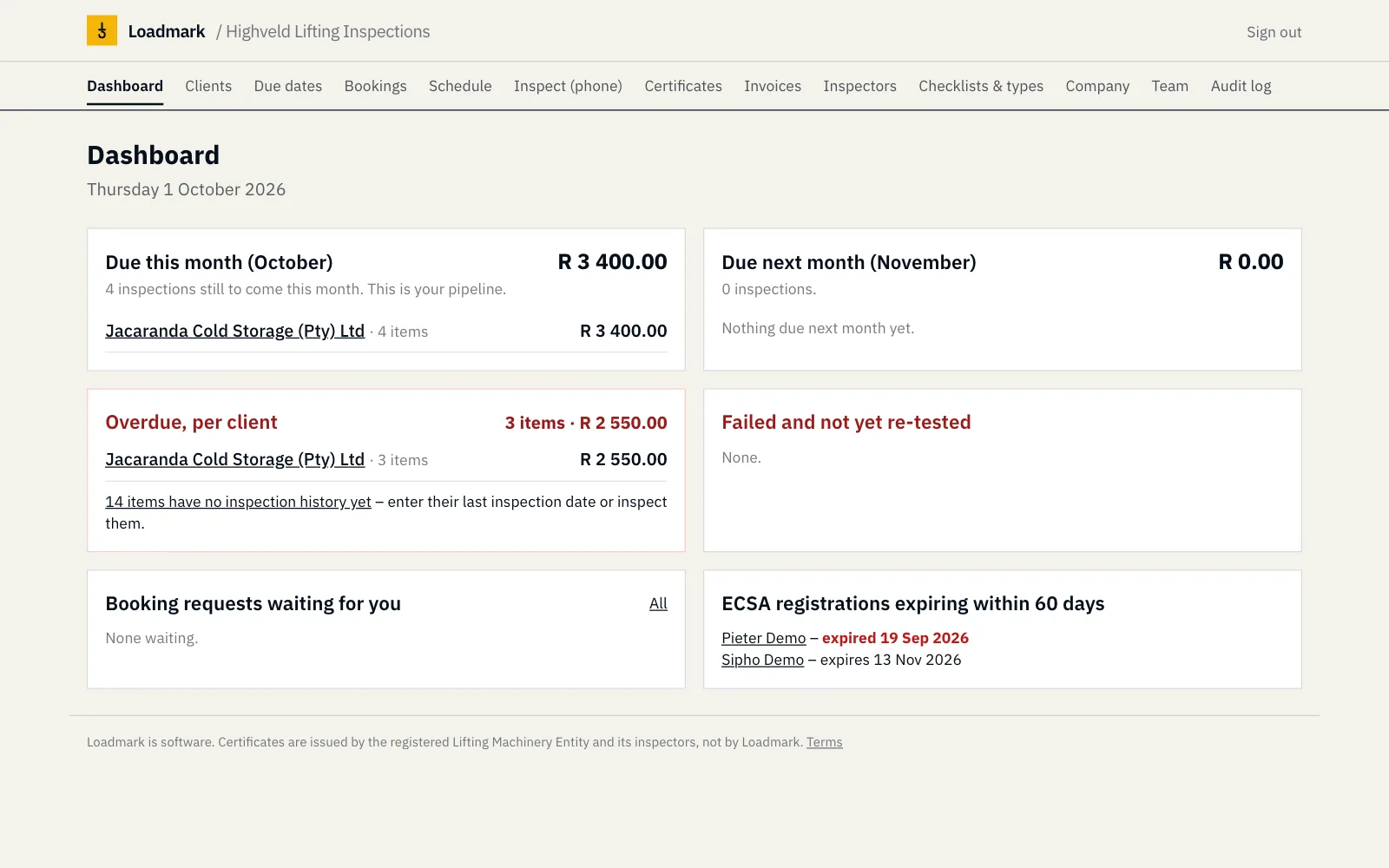
  • Inspections due this month and next, per client, in rand
  • Overdue machines per client, and failed machines not yet re-tested
  • Booking requests, and ECSA registrations expiring within 60 days
  • A weekly schedule with the machines due at each site listed for you
  • Invoices from your price list with call-out fee and VAT, as PDF or CSV
  • Upload a client's register as it is (Excel or CSV), with last inspection dates, or send us your files and we load them
  • Repair quotes made from a failed inspection: one line per defect, plus the re-test
  • Certificates, reminders and quotes ready to send on WhatsApp in one tap
  • Quarterly lifting tackle colour code on the phone and on every tackle certificate
  • A monthly email showing the rand value reminders and the portal brought back
The Loadmark owner dashboard
Fig. 3 · The owner's dashboard

5

Client portal

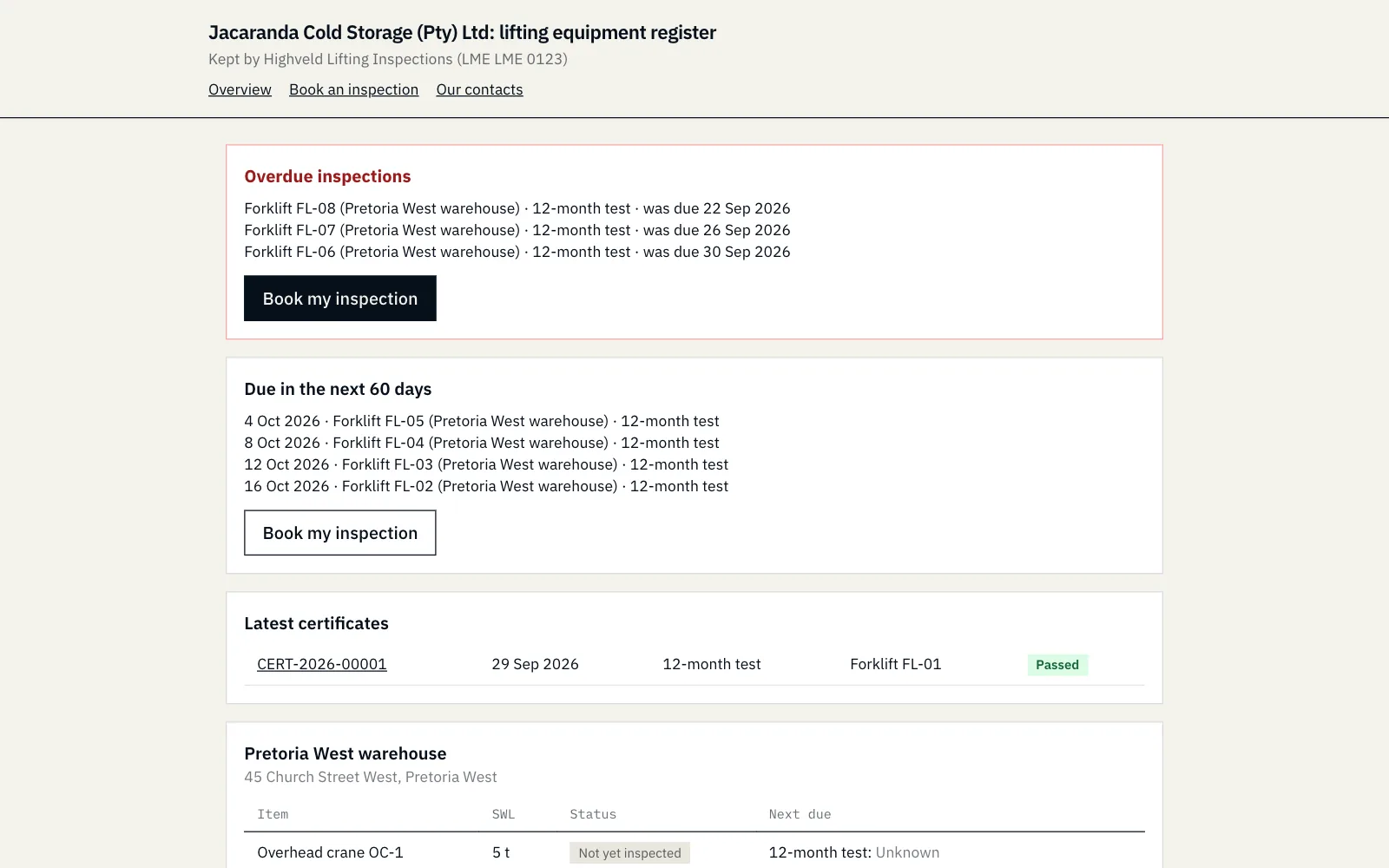
Free for your clients. They see their whole register: sites, machines, certificates, what's due and what's overdue. No password: a secure link arrives in every email.

  • Ready when the Department of Employment and Labour asks for records: one-click audit pack with the register and every current certificate
  • Accept your repair quotes with one click
  • Clients add their own colleagues to receive certificates
  • Failed equipment shown in red, so nobody uses it by mistake
The client portal showing a client's equipment register
Fig. 4 · A client's register in the portal

6

Compliance

Expired LMI can't sign
An inspector whose ECSA registration has lapsed is blocked from signing a 12-month performance test, on the phone and on the server.
No backdating
The inspection date comes from the phone at sign-off and can't be edited. Late uploads show both dates on the certificate.
Competence and LME scope
Inspectors can only sign for the machine types they're listed as competent for, and a 12-month test only for the machine types your LME registration covers.
Calibrated test equipment
Load tests use instruments from your test equipment list; one whose calibration has expired can't be picked. The certificate prints the instrument, serial and calibration certificate.
Append-only audit log
Who did what, when, from which device, with values before and after. Nobody can edit it.
Nothing is deleted
Certificates and inspection records can't be deleted while you use Loadmark, and scrapped machines are archived, not erased. If you stop, everything stays available read-only for at least 12 months, to download whenever you like.
POPIA
Contact details and ID numbers are access-controlled, with a retention period and one-click export or anonymise.

Try it on your next inspection.

Set up your company in two minutes and load a real client. 14 days free, no card needed.